0. 실습결론
(1) 실습과정
- php-fpm을 설치하고
- nginx.conf을 수정하여 php-fpm을 연결하고
- php 파일을 만들어 작동이 잘 되는지 확인한다
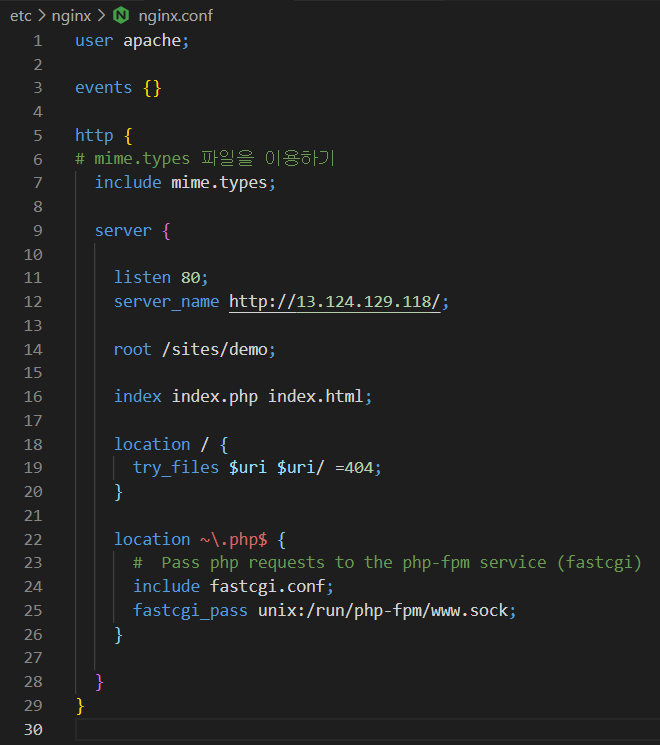
(2) 완성된 nginx.conf
1. 실습설명
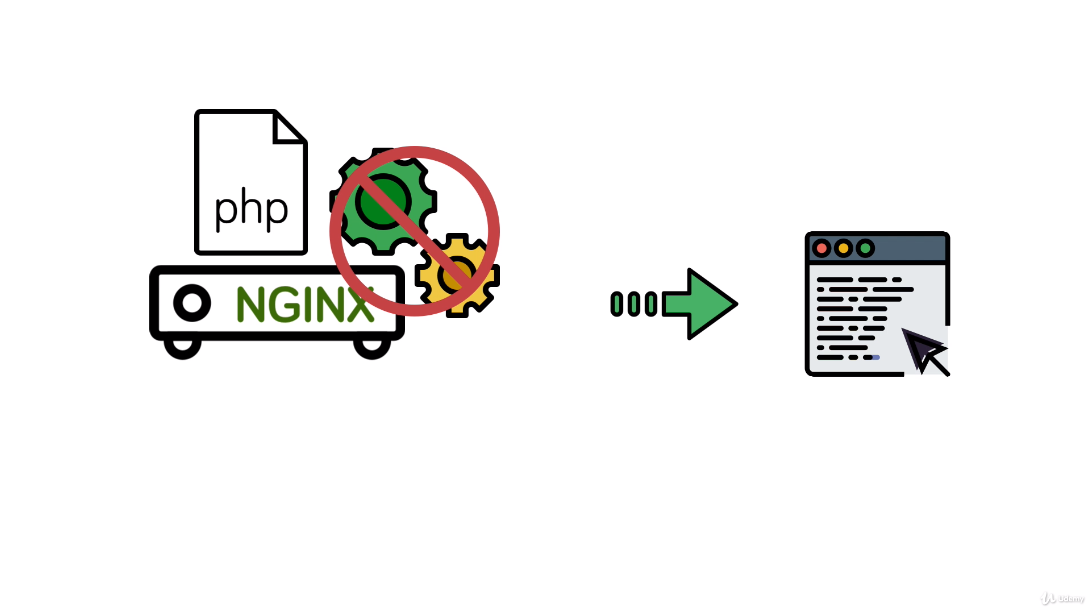
nginx는 apache와 달리 php같은 serverside language를 내장할 수 없다.
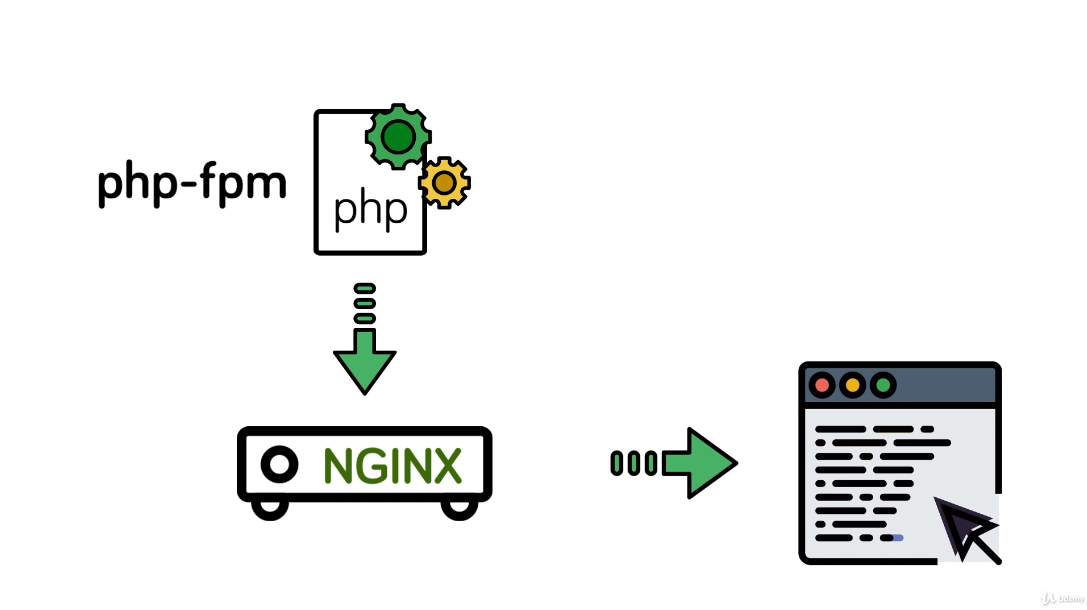
따라서 이번 실습에서는
1. nginx와 독립된 php-fpm 서비스를 만들고
2. nginx를 통해 php-fpm 에 request를 보내고
3. response(보통 html)을 돌려 받아서 client에게 돌려주는
구조를 만든다.
이런 구조 下의 nginx server를 reverse proxy server라고 한다.
cf-1. 실습설명에 나온 여러가지 용어들
(1) php?
- Personal Home Page Tools 의 약자에서 PHP:Hypertext Preprocessor 로 의미가 변경 되었다.
출처: https://opentutorials.org/course/62/233
PHP란 무엇인가? - 생활코딩
PHP란 무엇인가? 2011-09-16 00:06:20 Server side? PHP? 주로 HTML 코드를 프로그래밍적으로 생성 서버쪽에서 실행 되는 프로그래밍 언어 Personal Home Page Tools 의 약자에서 PHP:Hypertext Preprocessor 로 의미가 변경
opentutorials.org
(2) php-fpm?
- 뜻: PHP-fpm(PHP FastCGI Process Manager)
- 기능: PHP를 FastCGI 모드로 동작하도록 해준다.
(3) CGI?
- 뜻: CGI(Common Gateway Interface)
- 동작구조
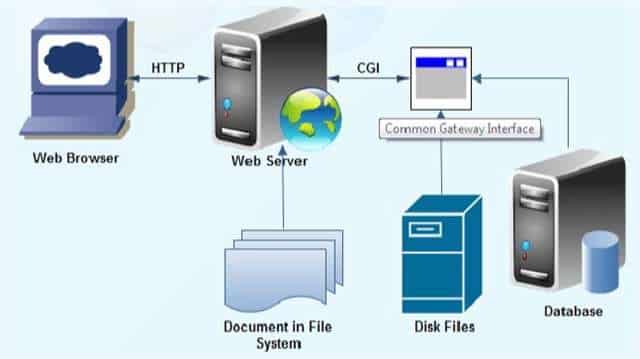
HTTP request에서 요구하는 reponse에 응용프로그램의 처리가 필요한 지에 따라 Web Server(Apache, nignx, ...)의 작동방식은 달라진다.
- 응용프로그램이 필요하지 않은 경우: Web Server가 직접처리 후 response
- 응용프로그램이 필요한 경우: CGI Application(Python, Ruby, Java, PHP, ...)에 처리를 위임하고 결과값만 받아서 response
이 때, Web Server와 CGI Application이 서로 소통하는 protocol이 CGI이다.
(4) fastcgi?
- 기존 CGI의 문제점을 개선하여 더 빠른 소통을 가능하게 만든 프로토콜
- nginx 에서 fastcgi를 사용하는 튜토리얼
https://www.digitalocean.com/community/tutorials/understanding-and-implementing-fastcgi-proxying-in-nginx
Understanding and Implementing FastCGI Proxying in Nginx | DigitalOcean
Nginx has become one of the most flexible and powerful web server solutions available. However, in terms of design, it is first and foremost a proxy server. This focus means that Nginx is very performant when working to handle requests with other serv
www.digitalocean.com
(5) proxy?
2. php-fpm 설치
(1) 설치후, 구동
## php7.2 패키지 활성화
sudo amazon-linux-extras enable php7.2
## 설치
sudo yum clean metadata && sudo yum install php-cli php-pdo php-fpm php-json php-mysqlnd
## 구동
sudo systemctl start php-fpm
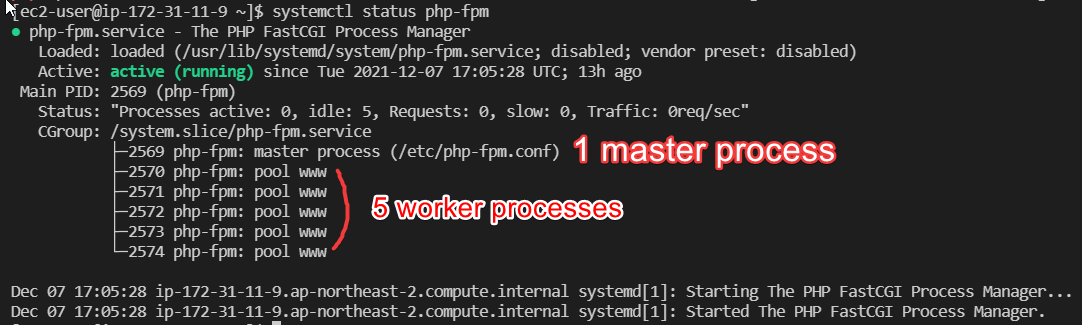
(2) 구동중인 php 관련 application 확인

(3) 조회된 php-fpm의 상태보기
3. nginx.conf 수정
(1) php based project 에서 많이 사용하는 방식으로 index 값 지정
# 먼저 index.php를 찾고 없으면 index.html을 찾게끔 설정
index index.php index.html;
(2) php based project에서 많이 사용하는 방식으로 location 값 설정
<1> static 처리 위한 location
# static content를 다루는 location
location / {
  try_files $uri $uri/ =404
  }
<2> dynamic 처리 위한 location
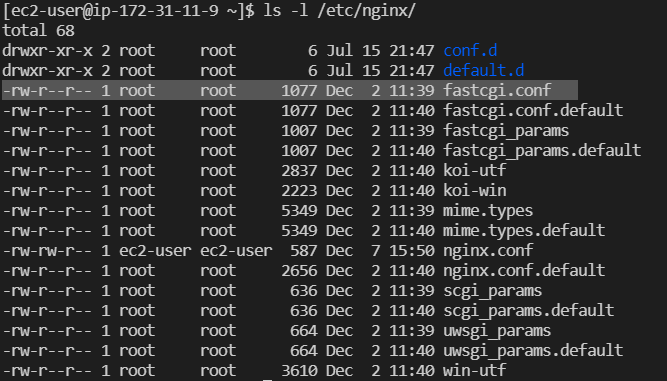
1) fastcgi.conf 를 include하여 common configuration items 불러오기
the Nginx developers and many distribution packaging teams have worked towards providing a sane set of common parameters that you can include in your FastCGI pass locations. These are called fastcgi_params or fastcgi.conf
# dynamic content를 다루는 location
location ~\.php$ {
  #  Pass php requests to the php-fpm service (fastcgi)
  include fastcgi.conf;
}
cf. The tilde(~) instructs nginx to perform a case-sensitive regular expression match, instead of a straight string comparison.
2) fastcgi_pass directive을 코딩하여 사용할 php-fpm을 nginx에 알려주기
# dynamic content를 다루는 location
location ~\.php$ {
  #  Pass php requests to the php-fpm service (fastcgi)
  include fastcgi.conf;
  fastcgi_pass unix:/run/php-fpm/www.sock;
}
socket은 httpd(Web server) port이고 server가 binary data를 받을 수 있게 해준다. socket은 다음 명령어로 찾을 수 있다.
# 의미: 루트디렉토리에서부터 fpm.sock으로 끝나는 것을 찾는다
find / -name *fpm.sock
그러나 amzon linux에서는 이런 파일명을 찾을 수 없다.

다음 링크를 참고하여 문제를 해결하자
https://stackoverflow.com/questions/17570658/how-to-find-my-php-fpm-sock
How to find my php-fpm.sock?
I'm running Wordpress with: Nginx + PHP-FPM + APC + W3 Total Cache + PageSpeed. After 3 days researching and configuring, I succeeded to make it work. I configured PHP-FPM to run via 127.0.0.1:900...
stackoverflow.com
그 결과 amazon linux(centOS 기반)의 경우 '/run/php-fpm/www.sock' 로 socket 파일이 만들어짐을 알 수 있었다.
(3) 정리
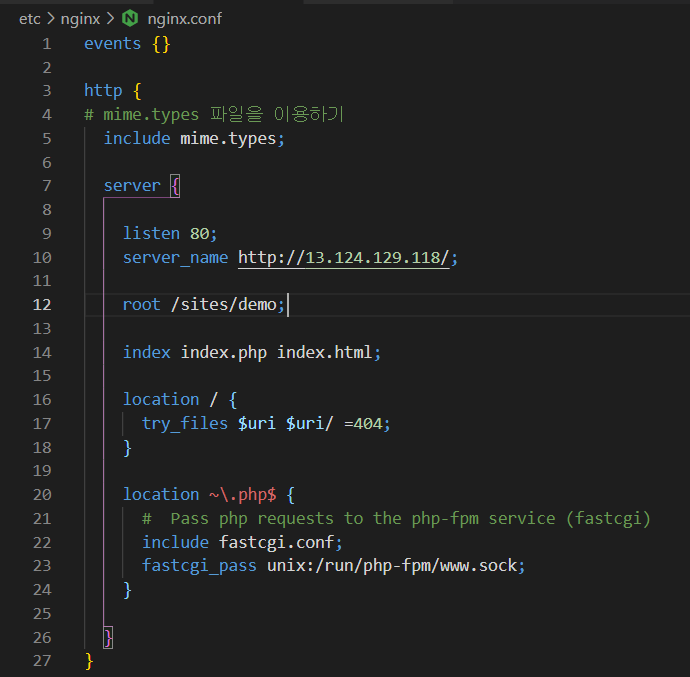
(1) (2)의 내용을 정리하면 nginx.conf이 이렇게 작성된다.
4. php-fpm이 잘 작동하는 지 확인
(1) 확인할 php파일 작성

(2) 접속해보기
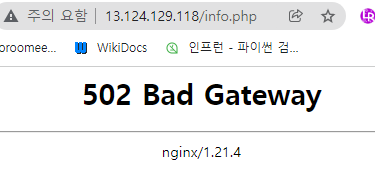
<1> 502 오류가 난다.
오류 로그를 조회하면

permission denied 문제임을 확인할 수 있다.
<2> 해결 방법은 여러가지가 있으나 가장 좋은 방법으로 알려진 것은 다음과 같다.

nginx의 worker process user가 nobody인데 반해

php는 user가 apache로 되어있다.
user를 똑같이 맞추어주면 permission 문제가 해결될 것이므로 nginx의 user를 apache로 바꾸어준다.
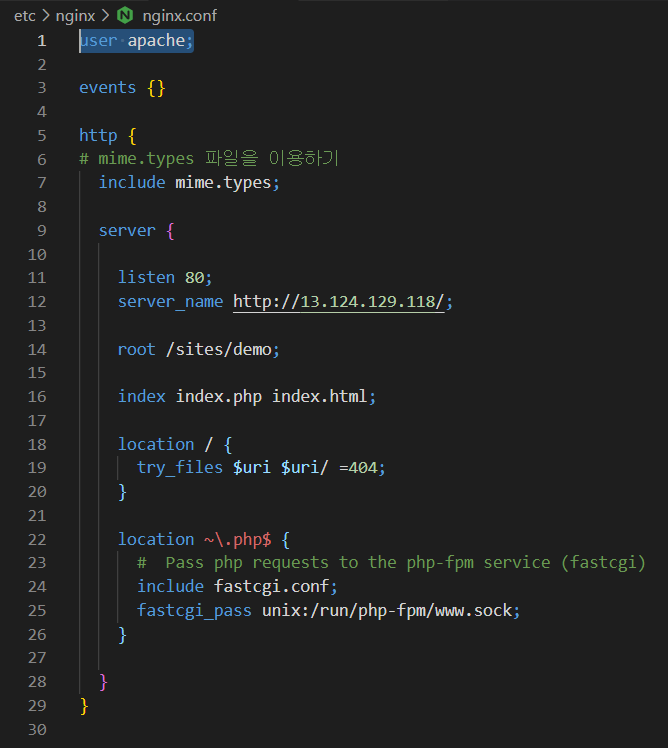
<3> 다시 접속하여 확인한다

5. index.php 파일까지 마저 작성함으로써 실습 마무리


'Tool > Nginx' 카테고리의 다른 글
| [NGINX] 3-10. Configuration - Buffers & Timeouts (0) | 2021.12.18 |
|---|---|
| [NGINX] 3-9. Configuration - Worker Processes (0) | 2021.12.18 |
| [NGINX] 3-7. Configuration - Inheritance & Directive types (0) | 2021.12.18 |
| [NGINX] 3-6. Configuration-Logging (0) | 2021.12.18 |
| [NGINX] 3-5. Configuration-try_files, Named Locations (0) | 2021.12.18 |


댓글